October 15, 2022
Run Code-First Database Migration in Kubernates co
Init container fit to run task like database migration or task that your need to run once before your application start in kubernates
Run Code-First Database Migration in Kubernates co
In Code-First Migrations, a generated change of database schema will store in our code. It will run to apply a change to database such as create table, add or remove column, etc.
Run migration on every time before your application start is a best practices. Trigger migration from your code make you not forget running a migration script on your database. In development environment or single instance deployment. This method will work perfectly because it run once. But in kubernates that will start multiple pods. It can be cause some issue if your application start a migration from every pods on start at once. That will be make a risk to your data in database. Init container come to solve this problem.
Init Containers in Kubernates
Init container is special containers that run before application container start.
- You can define multiple Init container.
- Init container must run to successfully completion.
- Init container run in single pods and sequentially. Must finished one by one container before other init container start
Init container best fit to run task like database migration or task that your need to run only once before your application start in kubernates, not on every popd
Example with Nest.js+ MikroORM
I create simple API with Nest.js using MikroORM for ORM and database migration. A popular ORM library TypeORM or Sequalize has a similar way to do a migration too.
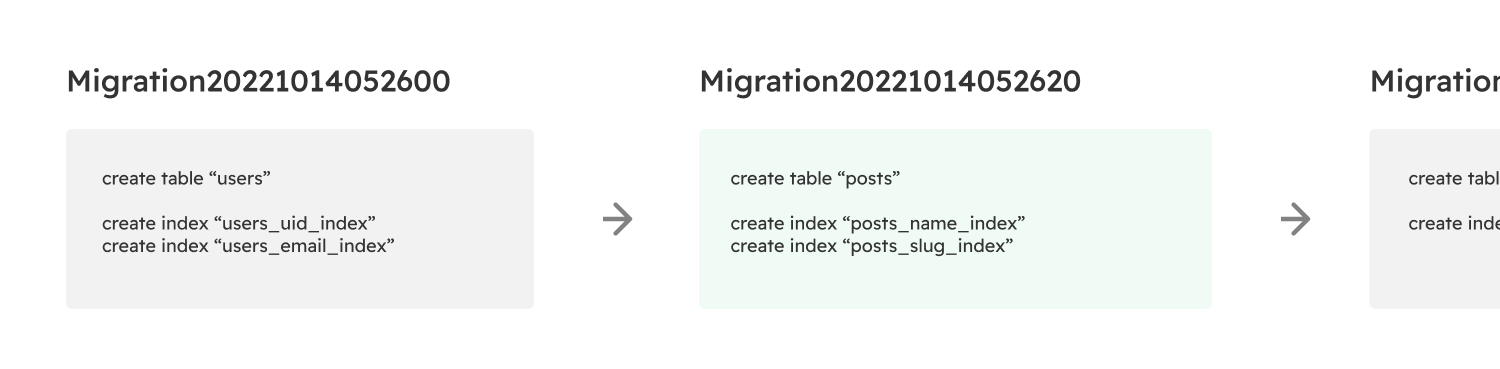
After we make a change to data model entity and run to generate migrating code via mikro-orm cli. A cli will automatic detect changes in our database schema and generate migration code in migrations folders
📦migrations
 ┣ 📜.snapshot-real_world_db_dev.json
 ┣ 📜Migration20221014052600.ts
 ┗ 📜Migration20221014052620.ts
import { Migration } from '@mikro-orm/migrations';

export class Migration20221014052620 extends Migration {
  async up(): Promise<void> {
    this.addSql('create table "users" ("id" serial primary key, "uid" varchar(255) null, "email" varchar(255) not null, "full_name" varchar(255) null, "photo_url" varchar(255) null, "status_id" int not null default 0, "recurring_type_id" int not null default 0, "last_invoice_date" timestamptz(0) null, "next_invoice_date" timestamptz(0) null, "created_at" timestamptz(0) not null, "updated_at" timestamptz(0) not null);');
    this.addSql('create index "users_uid_index" on "users" ("uid");');
    this.addSql('create index "users_email_index" on "users" ("email");');
  }
}
Then we create service to run migration before application start. To make a kubernates init container detect it migration run finished. We need to call process.exit(0) to make a node.js exit successfully.
@Injectable()
export class AppMigrationService implements OnModuleInit {
  private readonly logger = new Logger('Migration')

  constructor(private orm: MikroORM) { }

  async onModuleInit() {
    try {
      if(!HostConfig.RUN_MIGRATION) {  // Run Migration Flag
        return;
      }
      const migrator = this.orm.getMigrator()
      await migrator.up()
      this.logger.log(`DB Migrated`)

      if(HostConfig.EXIT_AFTER_MIGRATION) {
        process.exit(0);  // Successfully exit should provide for k8s init containers
      }
    } catch (error) {
      this.logger.error(error)
    }
  }
}
With this configuration. We can use environment variable to control are applications.
Local Development / Single Instance Deployment
Run migration but will not exit our application to continue start our api.
RUN_MIGRATION=true
EXIT_AFTER_MIGRATION=false
Kubernates with Init Containers
Run migration and make a successfully exit to tell kubernates terminate init container and start application container.
RUN_MIGRATION=true
EXIT_AFTER_MIGRATION=true
Deploy with Init Container in Kubernates
I using same docker image for our application and migration process. Then config to run migration in init container via environment variables.
containers:
  - name: real-world-api-service
    image: real-world-api:v0.0.1
    env:
			...
      - name: RUN_MIGRATION
        value: "false"
initContainers:
  - name: real-world-api-migration
    image: real-world-api:v0.0.1
    env:
			...
      - name: RUN_MIGRATION
        value: "true"
      - name: EXIT_AFTER_MIGRATION
        value: "true"
After make apply to kubernates clusters. It will run init container and wait for succesfully exit. Then terminate them and recreate a application containers in cluster. if your migration process hang or error. Init container will try to restart and not recreating application containers until init container finished successsfully.
NAME                                      READY   STATUS        RESTARTS   AGE
real-world-api-service-79dc797f98-8qnqd   1/1     Running       0          3h11m
real-world-api-service-79dc797f98-kqllz   1/1     Running       0          3h11m
// Start Init Containers
real-world-api-service-ffb58dbbf-f8ssg    0/1     Init:0/1      0          1s
NAME                                      READY   STATUS        RESTARTS   AGE
// Terminates Init Container and Old Application containers
real-world-api-service-66547d775f-wdrhh   0/1     Terminating   0          20s
real-world-api-service-79dc797f98-8qnqd   1/1     Terminating   0          3h11m
real-world-api-service-79dc797f98-kqllz   1/1     Terminating   0          3h11m
// Start new application containers after finished migrate
real-world-api-service-ffb58dbbf-f8ssg    1/1     Running       0          15s
real-world-api-service-ffb58dbbf-v2x7q    1/1     Running       0          9s